
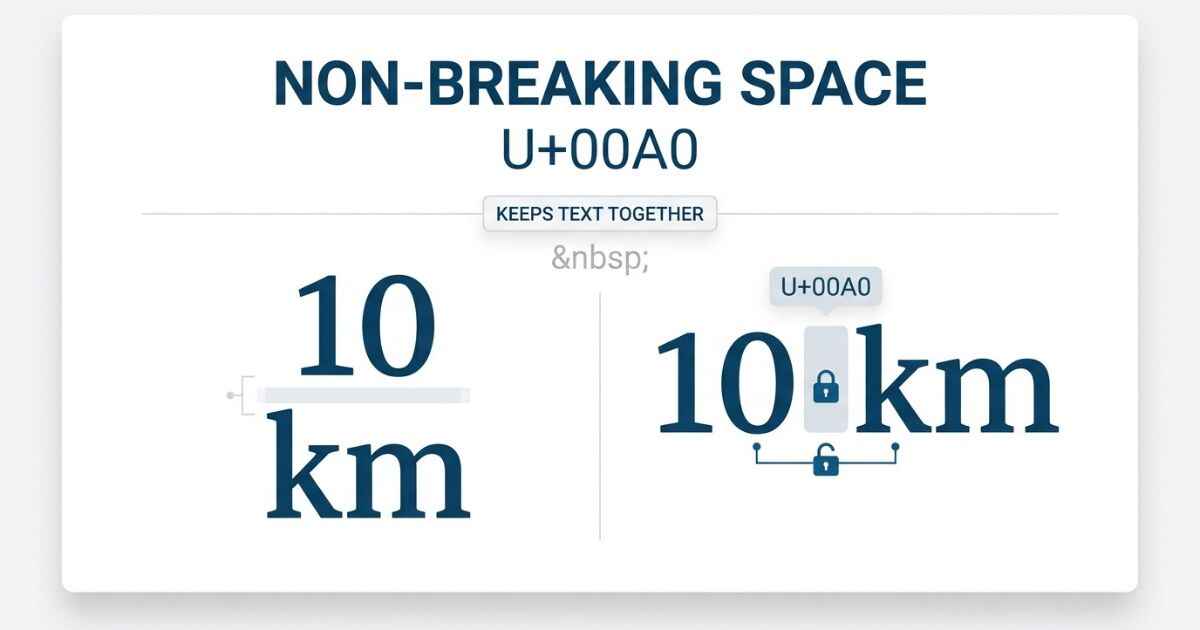
A non-breaking space is a Unicode character at code point U+00A0 that looks like a normal space but behaves differently in one key way. It keeps two words or symbols together on the same line and prevents a line break between them. Unicode classifies U+00A0 as a space character with the line-break property that prevents breaks around it.
U+00A0
Non-Breaking Space
Copy it and test it in the field you plan to use.
This guide covers where non-breaking space comes from, how it is used in real documents and web pages, why its Unicode category sets it apart from characters like Hangul Filler and zero width space, and the mistakes people commonly make with it.
Where Non-Breaking Space Comes From
Non-breaking space belongs to the Latin-1 Supplement block. Unicode identifies U+00A0 as NO-BREAK SPACE and notes that it should have the same width as a regular space.
Before digital typesetting, editors already knew that certain word pairs could look awkward or confusing when a line break landed between them. A number separated from its unit, a title separated from a name, or other closely connected text could become harder to read.
Non-breaking space solves this while still looking like a normal space. It takes up space, but it prevents a line break at that exact position. Unicode recommends it when two words should be visually separated but kept on the same line.
This combination of traits, normal visible width plus a refusal to wrap at that point, is what makes non-breaking space useful among whitespace characters.
| Example Without Non-Breaking Space | Risk | Fixed With Non-Breaking Space |
|---|---|---|
| “10 km” splits into “10” / “km” | Number and unit separated across lines | “10 km” stays together |
| “Mr. Smith” splits into “Mr.” / “Smith” | Title separated from name | Stays on one line |
| “$100” splits into “$” / “100” | Currency symbol separated from amount | Stays on one line |
Real-World Usage: Word, HTML, and Google Docs
- Microsoft Word and Google Docs support non-breaking spaces. The exact keyboard shortcut can depend on the application, so checking the app’s current shortcut list is the safest way to confirm it.
- Web pages use the HTML entity
to represent a non-breaking space. HTML character references can be used to represent characters such as non-breaking spaces. - Publishing and layout software can use non-breaking spaces to keep related text together when a line break would make the text harder to read.
Some languages and typographic traditions use non-breaking spaces before or around certain punctuation marks. The exact rules depend on the language and its typography.
Non-breaking spaces can also be useful when formatting measurements, names, abbreviations, and other text that should remain together.
Why Non-Breaking Space Behaves Differently
Non-breaking space belongs to the Zs, or Space Separator, Unicode category. Unicode lists U+00A0 among its space characters and identifies space characters with the General Category Zs.
| Category | Meaning | Example | Visible Width | Blocks Line Break |
|---|---|---|---|---|
| Zs | Space Separator | Non-breaking space | Yes | Yes |
| Lo | Letter, Other | Hangul Filler | Yes | Not its primary function |
| Cf | Format | Zero width space | No | Marks a possible break instead |
Hangul Filler, covered in a separate guide, belongs to the Lo category instead. It is therefore different from a Zs character such as non-breaking space.
Zero width space takes the opposite approach. It has no visible width and can mark a possible line-break point instead of preventing one.
A zero width joiner belongs to a different group again. It can affect how characters are joined or displayed in supported sequences rather than controlling normal spacing.
Common HTML and Word Mistakes
- Typing a regular space and expecting it to behave like
in HTML. Regular spaces can be collapsed during normal HTML whitespace processing, while a non-breaking space is treated differently. - Overusing non-breaking spaces throughout a paragraph, which can block natural line wrapping and create awkward spacing. Use them only where keeping text together is actually important.
- Reaching for a non-breaking space when the actual goal is extra visual width rather than blocking a line break. A wider whitespace character is usually a better fit for that specific goal.
- Assuming a non-breaking space fixes every kind of unwanted line break. It only prevents a break at that specific position. Text still wraps normally elsewhere in the sentence.
When You Should Actually Use One
Not every space that looks awkward at a line break needs fixing, so it helps to know when a non-breaking space is genuinely worth adding.
- Between a number and its unit, such as a measurement or temperature, where separating them across two lines makes the value harder to read.
- Between a short title and a name, such as an initial before a surname, where a line break in the middle looks like a formatting mistake.
- Around specific punctuation marks in languages with a formal typographic rule requiring it, rather than adding non-breaking spaces everywhere.
Unicode specifically recommends a no-break space when two words should remain visually separated but stay on the same line, such as a title and a name.
Outside of these specific cases, letting text wrap naturally is usually the better choice. Adding a non-breaking space everywhere a line break looks unusual can create more layout problems than it solves.
Non-Breaking Space FAQ
What does a non-breaking space actually do?
It looks like a normal space but prevents a line break at that position. This keeps two pieces of text, such as a number and its unit, together on the same line.
How do I type a non-breaking space in Word or Google Docs?
Both apps support ways to insert a non-breaking space. The exact keyboard shortcut can vary by application and platform, so checking the app’s current shortcut list is the most reliable way to confirm it.
What is the HTML code for a non-breaking space?
It is written as the entity inside HTML code. It represents a non-breaking space in rendered HTML.
Does a non-breaking space look different from a regular space?
No. Unicode specifies that U+00A0 should have the same width as a regular space. Its important difference is how line-breaking software treats it.
Can too many non-breaking spaces cause problems?
Yes. Overusing them can prevent natural line wrapping and lead to awkward spacing or layout problems.
Is a non-breaking space the same as a wide space?
No. A non-breaking space is intended to have the same width as a regular space. Wider spacing characters, such as an em space, are different Unicode characters designed for different spacing purposes.
Does a non-breaking space work the same in every language?
The character’s Unicode line-breaking behavior is defined by the standard, but how often it is used varies by language and formatting convention. Some languages use non-breaking spaces in specific typographic situations, while others use them less often.
Copy the non-breaking space above, then paste it directly between the exact words or symbols you want to keep together on one line.
1 thought on “What Is a Non-Breaking Space (U+00A0)? Meaning & Uses”
Comments are closed.