
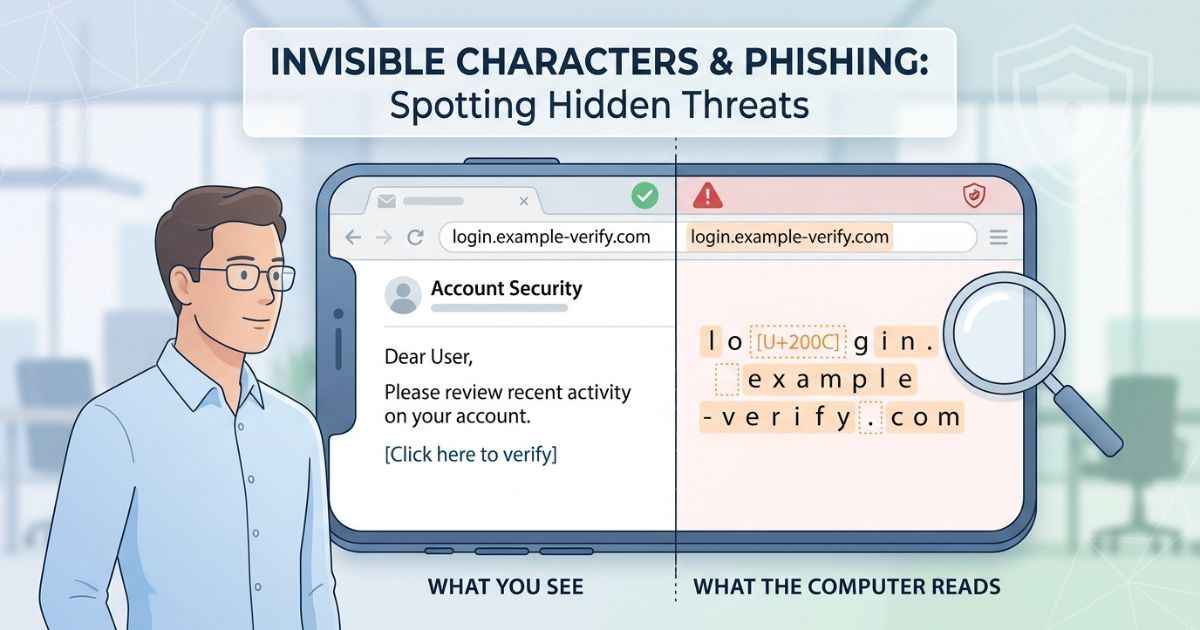
Invisible characters and phishing can sometimes appear together, though not in the way many people expect. A phishing attempt does not need an invisible character to work. Scammers can use hidden or unusual characters as one way to make a fake link or a fake name look more convincing than it should.
This guide explains the general pattern behind this trick, why it can fool people, and how to protect yourself. It does not walk through exact attack steps.
None of this is a new kind of danger unique to invisible characters. It is really the same old trick: getting someone to trust something that is not what it looks like. Invisible characters are just one small technique that can support that trick, not the whole scheme itself.
How a Disguised Link or Name Can Fool You
A phishing attempt usually tries to look like something you already trust, such as a bank, a company, or a person you know. Adding a hidden character to a name or link is one possible way a scammer can change the underlying text without making the difference easy to notice.
Most people read quickly. A busy reader glances at a name or a link and does not check every single character. A scammer can rely on this. If a hidden character sits somewhere inside a name, a person scanning it quickly may not notice anything unusual.
This works because the character may add no visible mark. A person sees what looks like a normal name. A computer system, on the other hand, processes the exact sequence of characters, not just how they look. To software, two names that look similar to a person can be different pieces of text.
This kind of trick is not limited to invisible characters either. It sits inside a much bigger category of deceptive text and lookalike identifiers. The goal is to make something fake look close enough to the real thing to earn quick trust. Simply knowing this pattern exists can help you slow down and look more carefully.
General Categories of This Kind of Trick
Scammers can use disguised text in a few broad, well-known situations. The underlying idea behind each one is similar, so understanding one can help you spot the others too.
Fake sender names in email try to look like a company or a person you already trust, hoping you will not look closely enough to notice something is off.
Fake or altered links can look similar to a real website address, but lead somewhere completely different once you actually click them.
Fake usernames on social media or messaging apps try to closely copy the look of a real account, hoping people will trust a message or a friend request without checking it carefully first.
| Where This Shows Up | What the Goal Usually Is |
|---|---|
| Email sender names | Make a stranger’s email look like it came from someone trusted |
| Links and web addresses | Make a fake destination look like a real, familiar one |
| Usernames and display names | Make a fake account look like a real, known account |
In every case, the actual goal is the same. Someone wants you to trust something before you have had time to check whether it actually deserves that trust.
Why This Trick Actually Works
This trick can work because what a person sees and what a computer processes are not always the same thing. A hidden character can change the underlying text without creating an obvious visual difference.
People read visually. Software processes characters and their underlying values. A hidden character may not look unusual to a person’s eyes because it adds little or no visible mark.
This gap is not a flaw hidden characters were designed to create. Every character in the Unicode standard, invisible or not, has defined purposes and properties. A character like zero width space has legitimate uses, including providing possible line-break opportunities. The same lack of visible width can also be misused when someone wants to disguise text. (unicode.org)
This is also why simply staring harder at a suspicious name or link may not help. Some differences are not easy to spot visually, so checking the actual destination or source is safer.
How to Protect Yourself
You do not need deep technical knowledge to lower your risk here. A few simple habits can help you catch these situations before they cause harm.
Slow down before trusting an unexpected message, link, or friend request, especially one that asks for personal information or urges you to act quickly.
Check a link’s actual destination before clicking it, rather than trusting how the visible text describes it. Many browsers and email apps show the destination when you hover over a link. On a phone, you can often press and hold the link to preview it.
If a name or piece of text looks slightly unusual, or you are not sure whether it has been altered, running it through a character scanning tool shows which characters are actually present, including hidden ones.
Report anything that looks like an impersonation attempt to the platform involved. Many major platforms provide ways to report suspicious accounts or messages.
This is a different concern from the one covered in a guide to invisible characters and accessibility, which focuses on how these characters can affect text and assistive technology rather than security. Both guides are useful if you plan to use invisible characters beyond a personal username.
Frequently Asked Questions
Are invisible characters themselves dangerous?
No. They are standard Unicode characters with legitimate purposes. The risk comes from how someone chooses to use them, not from the character itself.
Can a character scanner stop phishing completely?
No single tool can guarantee full protection. A scanner is one useful step. Combining it with careful checking habits works better than relying on one method alone.
Why don’t platforms just block every invisible character?
Some platforms restrict or remove certain invisible characters in specific fields. Fully blocking every invisible character everywhere could also interfere with legitimate uses. The rules depend on the platform and the type of field.
Does this affect me if I only use invisible characters in my own username?
This particular risk mostly applies to situations where a fake name or link is trying to impersonate something else. A personal username chosen for privacy or style is generally a lower-risk situation.
Is this the same thing as a general phishing scam?
Not exactly. A hidden character is only one small technique that can support a phishing attempt. Most phishing scams do not use invisible characters and rely on other tricks instead.
What should I do if I think I already fell for something like this?
Change any affected passwords right away, especially if you entered them on a suspicious website. Check your account activity for anything unfamiliar. Reporting the incident to the platform involved is also a good next step.