
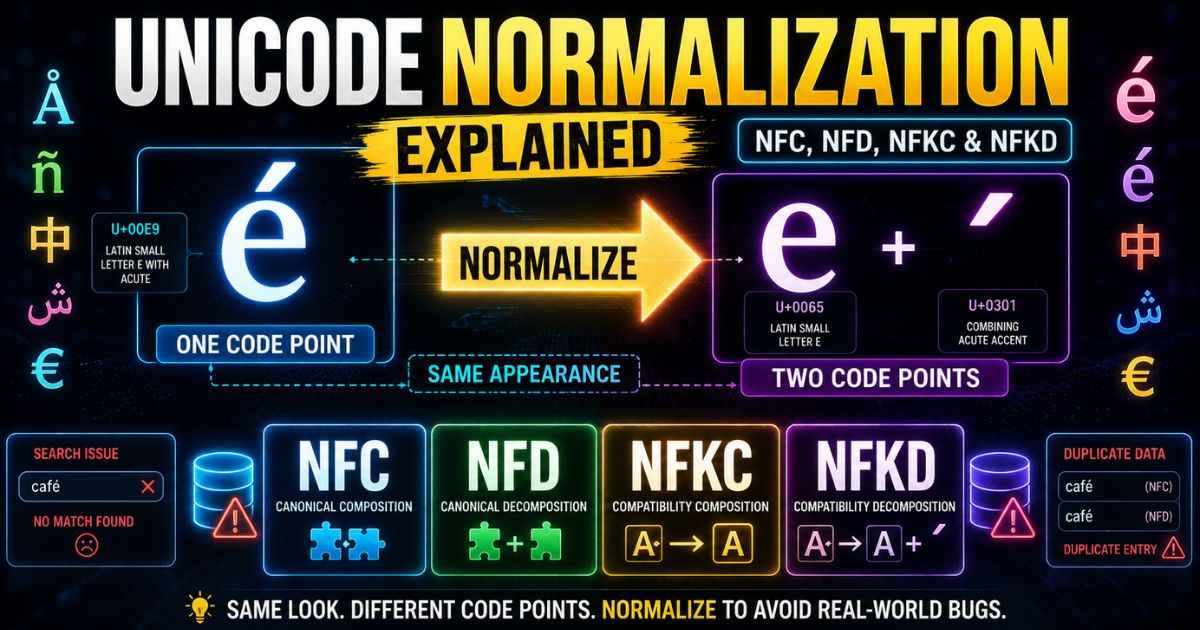
Unicode normalization takes different but equivalent text representations and puts them into a consistent form. It gives applications a standard way to compare text that may use different sequences of Unicode code points. Without this step, the same visible text can be stored in more than one way, which can cause problems with text comparison, searching, and data handling.
This guide explains why this problem exists, covers the four standard normalization forms, and shows real problems that can happen when developers skip this step.
The Core Problem: Two Ways to Store the Same Letter
A letter like é can be stored in two canonically equivalent ways. It can be one precomposed code point, or it can be two code points: a plain e plus a separate combining accent mark. Both can look the same on screen, but a computer sees different sequences of code points.
| Form | Code Points | Visible Result |
|---|---|---|
| Precomposed | One code point for the whole letter | é |
| Decomposed | Two code points: base letter plus accent mark | é |
This happens because Unicode supports combining characters. Instead of giving every possible combination its own code point, some characters can be represented using a base character and one or more combining marks. Both representations can be valid and canonically equivalent.
NFC and NFD: The Two Basic Forms
NFC stands for Normalization Form C. It first applies canonical decomposition and then canonical composition. Where a suitable precomposed character exists, NFC generally produces the composed form. NFD stands for Normalization Form D and produces the canonical decomposed form.
Using either form consistently makes it easier to compare canonically equivalent text. Unicode notes that NFC is a good general form for text, while NFD is often useful for internal processing.
NFC is a common choice for general text handling. It also matches legacy text usage well. However, there is no single normalization form that is best for every application.
NFD is useful for other jobs. It produces separate base characters and combining marks, which can be useful for internal text processing and some search or sorting tasks.
NFKC and NFKD: The Compatibility Forms
NFKC and NFKD go one step further than NFC and NFD. They also remove certain compatibility distinctions. This can make different compatibility characters compare as equivalent, but it can also remove formatting distinctions that may matter in the original text.
One example is full-width characters used in some East Asian text. Compatibility normalization can map compatible full-width and half-width forms to a common representation. This can help with matching, but it changes the original character representation.
NFKC and NFKD should not be used blindly on arbitrary text because they can remove distinctions that are important to the meaning or formatting of the text.
This is a different kind of change from what a zero width joiner does. Normalization changes a Unicode string into a standard form. A zero width joiner is a character that can affect how characters are displayed in supported sequences, including certain emoji sequences.
Real Developer Bugs Caused by Skipping Normalization
String comparison can break when two strings look the same but use different canonically equivalent sequences. One string may use a precomposed letter while another uses a decomposed sequence.
Databases can also run into problems if equivalent text is stored using different representations. For example, the same name could be stored using NFC in one record and NFD in another. A simple binary comparison could treat those sequences as different even though they are canonically equivalent.
Search features can have similar issues. A search system may need to account for canonically equivalent sequences when comparing text. Unicode recommends normalization when applications need a unique representation for equivalent strings.
The fix is to normalize text when the application needs consistent representations. NFC is a common choice for general text, but the right normalization strategy depends on the type of text and application.
Every one of these forms works with the same Unicode code points explained in a guide to Unicode, just represented differently. Since normalization can change the number of code points in a piece of text, it can also change how many bytes that text needs once it gets stored using UTF-8 or UTF-16.
Frequently Asked Questions
Which normalization form should I use by default?
NFC is a good general choice for text. Unicode’s FAQ describes NFC as the best form for general text because it is more compatible with strings converted from legacy encodings.
Does normalization change how text looks on screen?
NFC and NFD are canonically equivalent, so they can display the same visible text even though their underlying code point sequences differ. NFKC and NFKD can change compatibility distinctions and may therefore change the way some text is represented or displayed.
Can normalization fix every text comparison bug?
No. It fixes differences caused by canonically or compatibility equivalent Unicode sequences. It will not automatically fix unrelated differences such as capitalization, spelling, or extra spaces.
Is NFC or NFD used more often in practice?
NFC is commonly used for general text handling. NFD is more often useful for internal processing and certain specialized tasks. The best choice depends on the application.
What is a combining character?
A combining character is a Unicode character that combines with another character, usually the character before it. A combining accent mark is one example.
Does normalization affect file size?
Yes, potentially. A decomposed sequence can use more code points than a precomposed character, which can sometimes increase the number of bytes required when the text is encoded. The exact difference depends on the characters and encoding being used.