
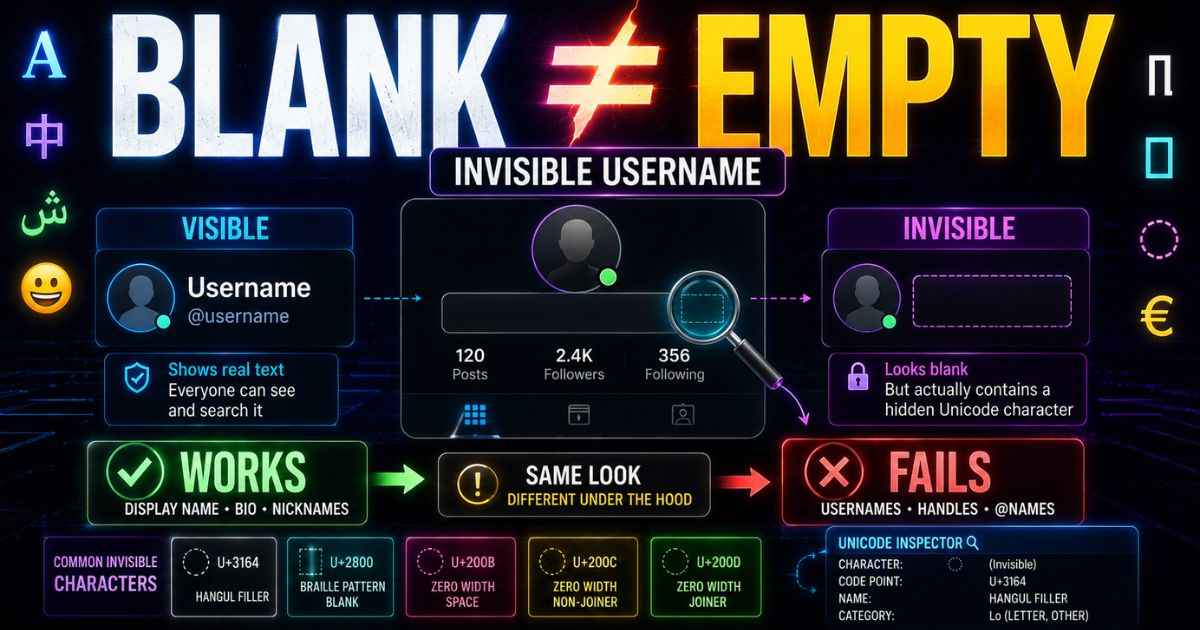
An invisible username is a name that looks blank but is not actually empty. People use invisible usernames on many apps, games, and websites. The effect usually comes from a Unicode character that has little or no visible appearance, rather than from an ordinary space.
This guide explains how invisible usernames work in general. It covers privacy reasons, common mistakes, and a simple way to pick the right character for your situation. If you already know which platform you want to use, jump straight to the platform list near the bottom of this page.
How Different Fields Handle Invisible Usernames
Most apps do not have just one name field. They usually have two or three. Each field follows its own rules.
Your username, sometimes called your handle, is often the strict one. It has to follow the platform’s rules, and it may need to be unique. Some apps only allow certain letters, numbers, or symbols here. An invisible character may not work in this field. The exact rules depend on the platform.
Your display name is different. It sits above your username, and many people see it first. This field can allow more characters than a username, but support for invisible characters still depends on the platform.
Your bio is often more flexible than a username. It may accept multiple lines of text. This can make it a useful place for spacing characters, but invisible characters are not guaranteed to work there.
| Field | How Strict | Invisible Character Chance |
|---|---|---|
| Username or Handle | Very strict | May not work |
| Display Name | Medium | Depends on the platform |
| Bio | Relaxed | Depends on the platform |
This pattern does not repeat across every app. Each platform can apply its own rules to Unicode characters. You can see how much this reliability changes character by character in the full character comparison.
Why People Choose an Invisible Username
People pick invisible usernames for more than one reason.
Some want privacy. A blank-looking name does not reveal a visible name or word. It also does not draw attention in a crowded list of usernames.
Some want a clean look. A blank name can make a profile photo or an avatar stand out more, since there is no text competing with it.
Some just enjoy the surprise. A name that looks empty gets noticed exactly because it looks unusual.
There is a trade-off, though. An invisible username can make an account harder for people to identify or find. Search systems do not all handle invisible characters in the same way. A blank-looking name may not behave like a normal visible name in search.
Common Mistakes People Make
Even a simple change like this can go wrong. Here are the mistakes people run into most.
Using a plain space instead of a real character. A normal space may be trimmed or rejected by an app. It looks empty in the text box, but the system may remove it before saving.
Using the same character everywhere. A character that works well on one app can fail completely on another. Each app has its own rules for Unicode characters.
Copying a name from someone else without checking it. A copied name can carry more than one hidden character stacked together. This can cause strange results when you try to reuse it. A character scanning tool can show exactly what is hidden inside copied text before you use it.
Pasting messy leftover text. Sometimes a copied name brings along extra invisible characters you never wanted. A cleanup tool can strip these out before you try again.
A Simple Way to Decide Which Character to Try
You do not need to memorize every character. A simple three-step check works for almost any app.
First, try a character that has a visible width but little or no visible mark. These characters can behave differently from zero-width characters, but whether they survive depends on the field.
Second, if that fails, try a zero-width character instead. These add no visible space at all. They may work better in some relaxed fields, like a bio or a message.
Third, if you need more than one character in a row, for example to build spacing inside a longer bio, a text generator can build a custom-length string instead of pasting one character over and over by hand.
If none of these work, the field you are using may simply reject invisible characters. Some apps restrict these characters on purpose.
If you want the technical reason behind why some characters survive and others get stripped, a guide to what Unicode actually is explains the numbering system every one of these characters is built on.
Invisible Character Guides by Platform
Every app applies its own rules to invisible characters. This list points you to the exact guide for each platform, with steps and character recommendations.
Discord covers your display name and your per-server nickname, which can follow different rules from each other.
PUBG covers your in-game name and the one-time free rename most accounts get.
Instagram covers your bio, your Name field, and your story highlight titles.
TikTok explains why your username has stricter rules, and what to use instead.
WhatsApp covers your profile Name, your About text, and sending a blank message.
Roblox covers your Display Name and how Roblox’s safety filter treats certain characters.
Facebook explains why your profile Name carries extra rules, and which fields may be safer to test instead.
Steam covers your Persona Name and the rename options available on Steam.
X covers your Display Name and Bio, and why your handle has stricter character rules.
Invisible Username Guide: Frequently Asked Questions
Is using an invisible username against the rules?
It depends on the platform and the specific field. Invisible characters are Unicode characters, but an app may restrict, strip, or prohibit them in usernames or display names. Check the platform’s current rules before using one.
Can I use the same invisible character on every app?
Not reliably. Each app runs its own checks on text you type in. A character that works perfectly on one app can get rejected or stripped completely on another.
Will an invisible username make my account harder to find?
It can. Search features handle invisible characters differently across platforms. A name made only of an invisible character may not match search terms the way a name with visible letters would.
Why does my invisible name work on one device but not another?
This can be caused by font support, text rendering, or the way the app processes that character. A character may be accepted by one system but displayed differently or filtered by another.
Do invisible characters count toward a character limit?
They can. Whether an invisible character counts toward a limit depends on how the platform measures characters in that field.
Is there a real technical reason some characters work and others do not?
Yes. Unicode characters have different properties, and apps can choose which characters they allow or reject. Unicode also provides security guidance for identifiers and recommends restricting characters in some identifier systems. This is why results vary so much between platforms.
Can I remove an invisible character if I change my mind?
Yes. Clearing the field and typing a normal name works the same way it always has. Invisible characters do not lock a field or change how you edit it later.